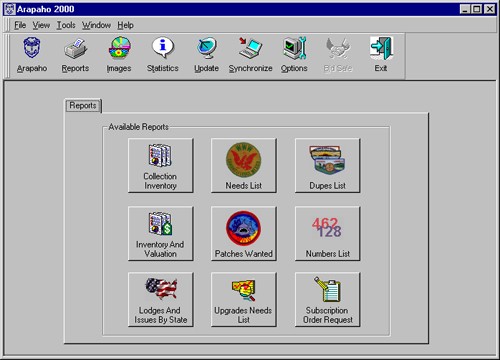
ARAPAHO 2000 REPORTS SCREEN
From the Reports Menu the user can customize and run a variety of detailed reports.
The following Reports are available in Arapaho 2000. Each report has it's own print options, depending on the report.
COLLECTION INVENTORY Compiles a list of all issues in your collection. INVENTORY AND VALUATION Compiles a list of all issues in your collection, or all issues above a dollar value you set. The default setting is 0.00, which will cause a report to be generated that includes all patches for which you have entered data. If you want a report of just your more valuable patches, or those above a certain value, input this amount in the applicable box. LODGES AND ISSUES BY STATE Compiles a list of all issues. This report can be run in three modes: In Collection, Needs, or Wants. The report can be generated using a variety of options, such as sorting by lodge numerically, alphabetically, by state, or a combination of these. The Range Box allows the User to define by Lodge Number which lodges to report. A report can be compiled for one lodge by entering the same Lodge Number in both the "From" and "To" fields. NEEDS LIST Compiles a list of all issues you have marked as "Needs". PATCHES WANTED Compiles a list of all issues you have marked as "Wants". UPGRADE NEEDS LIST Compiles a list of all issues in your collection not in mint condition. DUPES LIST Compiles a list of all duplicates in your collection. NUMBERS LIST Compiles a list, by lodge, of all lodges meeting one of following criteria: All Issues, Needs, or Wants. The report can be generated using a variety of options, such as sorting by lodge numerically, alphabetically, by state, or a combination of these. SUBSCRIPTION ORDER REQUEST Prints form on which you can order a subscription to one or more of the special services offered by Arapaho Software.
Page Last Modified: 26 June 2001
Copyright Notice
Copyright © 2001, Arapaho Software