ARAPAHO 2000 ISSUE AND IMAGE SUBMISSION
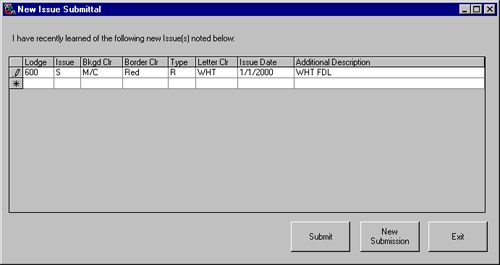
Similar to the "New Issue Submittal" in Arapaho II On Disk!!, this option allows you to not only print out a New Issue Submittal form, but to submit information via the Internet (FTP), or over the Web (directly to the Arapaho web site).
OVER THE INTERNET FEATURE The Over the Internet option allows you to FTP new issues to Arapaho 2000. Enter the appropriate information for submission. Enter as many issues as you need by typing the information in the row with the asterisk (*) in the frame. You can leave and come back at any time and the information from your previous session is saved. When you have completed your new issues submittal, press the "SUBMIT" button to send the issues to Arapaho Software over the Internet. If you are not currently connected to the Internet, Arapaho 2000 will prompt you to connect. Once the transfer is complete, Arapaho will ask you if you want to clear the current list. If you choose no, your data will be saved. Once you are ready to clear the list of issues, press "NEW SUBMISSION" and all records will be cleared.
The patch image submittal allows you to FTP any patch images you have to Arapaho Software for possible inclusion in their Patch Image Database.
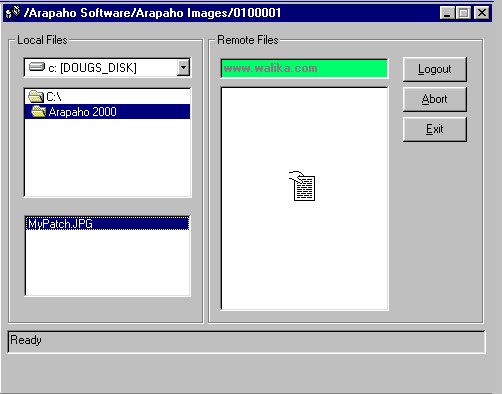
SENDING PATCH IMAGES TO ARAPAHO
To ensure that your images are considered for use, please be sure that you use the following standards:SCANNED IMAGE STANDARDS
1. Set scanner resolution to 100 DPI, full-color.
2. Scan size at 100%.
3. Save as a JPG, if possible.
Click Here for More Details and Screen Captures!!
Page Last Modified: 26 June 2001
Copyright Notice
Copyright © 2001, Arapaho Software